Tents is also called Tents and Trees. It is a small camping puzzle on a square grid.
The rules
- Give every tree its own tent right next to it: above, below, left or right.
- A tent next to a tree only at a corner does not count for that tree.
- A tent can stand next to several trees, but it belongs to just 1 of them.
- Tents may never touch, not even at a corner.
- The numbers on the edges say how many tents each row or column still needs.
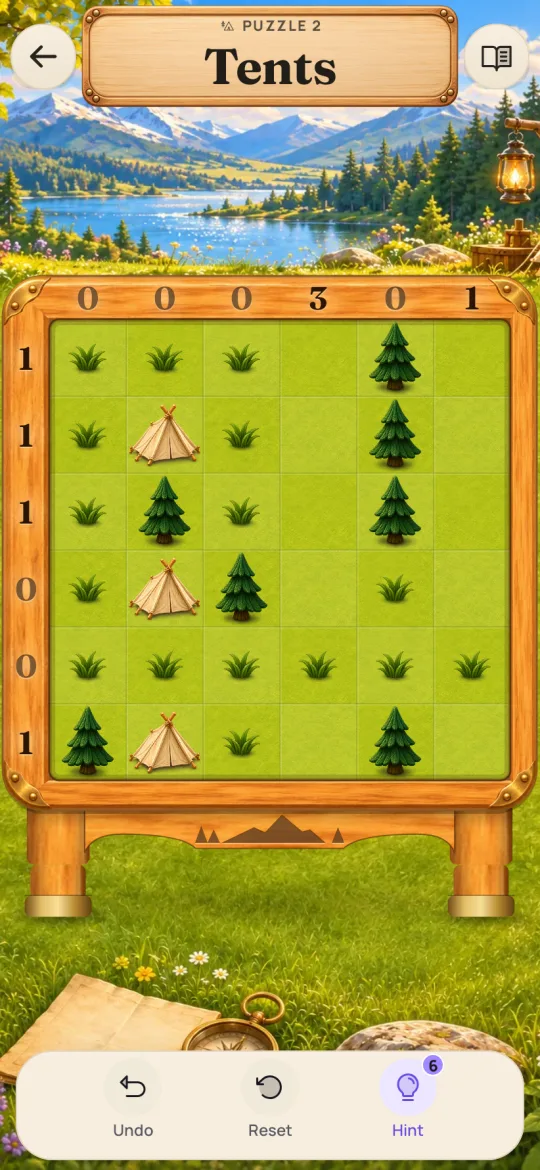
In Quirk the edge numbers count down as you place tents. A 0 means that row or column is done. In classic Tents the numbers show the total and stay the same. The rules are the same either way.
A worked example
Here is a 4 × 4 board with 3 trees. The labels show how many tents each row and column needs at the start.
| Column 1: 1 | Column 2: 0 | Column 3: 1 | Column 4: 1 | |
|---|---|---|---|---|
| Row 1: 1 | Tree | |||
| Row 2: 1 | Tree | |||
| Row 3: 0 | ||||
| Row 4: 1 | Tree |
- Row 3 and column 2 need no tents. Mark all their open boxes empty.
- Look at the tree in row 4, column 3. The box above it is in row 3, so it is empty.
- The box to its left is in column 2, so that is empty too. Below it is the edge. Its tent must go to its right, in row 4, column 4.
- Column 4 needed 1 tent and now has it. So row 1, column 4 stays empty.
- Now look at the tree in row 2, column 4. Above it is row 1, column 4, which is empty. Below it is row 3, which is empty.
- To its right is the edge. So its tent goes to its left, in row 2, column 3.
- Every box touching that tent stays empty, also at the corners. That includes row 1, column 3.
- Last, the tree in row 1, column 2. Above it is the edge. Below it is column 2, which is empty. Row 1, column 3 is out too.
- The only spot left is to its left, in row 1, column 1. Put the tent there.
- Check the counts. Each row and column has the right number of tents. Each tree has its own tent, and no tents touch.
Beginner techniques
Start with zeros and full lines
A row or column with 0 needs no tents. Mark its open boxes empty. Do the same once a row or column has all its tents.
A box with no tree above, below, left or right of it can never hold a tent. You can mark it empty too.
Clear the boxes around a tent
A tent touches 8 boxes around it, also at the corners. None of them can hold another tent. Mark them empty as soon as you place a tent.
A tree with one spot left
Check each tree in turn. If only 1 box next to it can still hold a tent, the tent goes there.
The shared corner
Say a tree can only have its tent to its right or below it. Those two spots meet at a corner. The box between them, below and to the right of the tree, touches both. So that box stays empty, whichever spot the tent takes.
Count the ways in a row
Say a row needs 2 tents, and only 3 boxes are still open, side by side. Tents next to each other would touch. So the tents must go in the two end boxes, and the middle one stays empty.
Common mistakes
- Putting a tent at a corner of its tree. It must be above, below, left or right.
- Letting two tents touch at a corner.
- Giving two trees the same tent. Each tree needs a tent of its own.
- Forgetting that the edge numbers in Quirk count down. A 0 means no more tents there.
- Marking every empty box when you do not need to. Unmarked boxes count as empty.
Questions
Is Tents the same as Tents and Trees?
Yes. Tents and Trees is another name for the same puzzle. The rules are the same.
Can a tent be next to two trees?
Yes. A tent can stand next to several trees. It still belongs to just 1 of them.
Do I have to mark the empty boxes?
No. Empty marks only help you think. Any box without a tent counts as empty when Quirk checks the board.
Does every puzzle have one answer?
Yes. Each Tents puzzle in Quirk has exactly one right place for every tent.
What sizes are there in Quirk?
The boards start at 5 × 5 and go up to 9 × 9. Bigger boards have more trees to pair with tents.
What can I do when I am stuck?
Ask for a hint. It shows a box, row or column and tells you why. You can also undo moves or reset the puzzle.
Related puzzles
Playing it in Quirk
Tap a box for a tent. Tap again to mark it empty, and once more to clear it.
Drag across boxes to mark them all empty. Tents go one at a time. A drag that starts on a box marked empty clears the boxes instead.